Change Testing (A/B)
Measure the impact of retrieval changes (e.g., top k, hybrid search, rerankers) before you ship. Seer runs evaluator-defined metrics (Recall, Precision, F1, nDCG) on unlabeled traffic.
Overview
- Log each retrieval with
feature_flagin metadata indicating the variant used. - Send traffic to both variants (split via your own A/B system or run offline comparisons).
- View comparisons in the Seer Change Testing dashboard.
- Ship the winner with confidence.
Prerequisites: You've completed the Quickstart and reviewed the Context & Event Schema.
Integration Pattern
Add feature_flag to your metadata to identify which variant handled each request:
from seer import SeerClient
import os

client = SeerClient()

# One retriever; behavior toggled by variant
def retrieve(query: str, variant: str) -> list[dict]:
    if variant == "v2":
        # e.g., k=20 + hybrid + reranker
        return [{"text": "...topk results for v2...", "score": 0.9}]
    else:
        # e.g., k=10 + bm25
        return [{"text": "...topk results for v1...", "score": 0.85}]

def handle_request(query: str, user_id: str):
    # Select variant from your flagging system
    variant = os.getenv("RETRIEVAL_VARIANT", "v1")

    context = retrieve(query, variant)

    client.log(
        task=query,
        context=context,
        metadata={
            "env": os.getenv("APP_ENV", "prod"),
            "feature_flag": variant,              # <- key field for change testing
            "user_id": user_id,
        },
    )

# Example
handle_request("best subwoofer size for small room", user_id="u_123")
Pass their flag string directly as feature_flag so Seer's charts align with your routing.
The Change Testing Dashboard
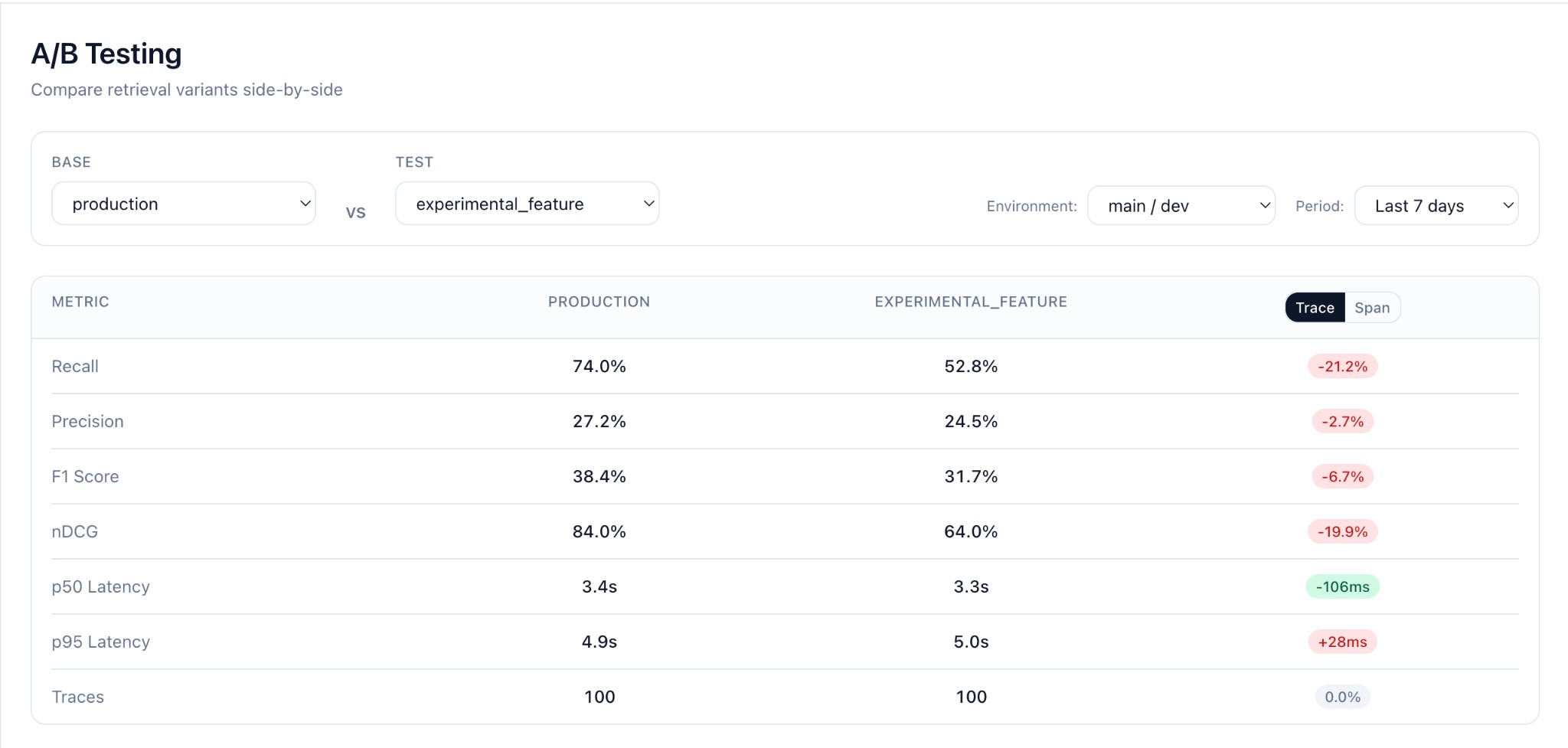
After logging records with different feature_flag values, open the Change Testing page in Seer.
Selecting Variants to Compare
- Choose Base variant from the dropdown (e.g.,
production) - Choose Test variant to compare against (e.g.,
experimental_feature) - Select Environment (e.g.,
main / dev) - Set Period to filter traffic (e.g.,
Last 7 days)
Metrics Comparison
Seer computes for each variant:
| Metric | Description |
|---|---|
| Recall | Fraction of requirements covered by context |
| Precision | Fraction of documents that support any requirement |
| F1 | Harmonic mean of recall and precision |
| nDCG | Ranking quality (if scores provided) |
The dashboard shows:
- Metric cards with absolute values per variant
- Delta (candidate - baseline) with percentage change
- Trace/Span toggle to view metrics at different levels
- Record count per variant
Interesting Queries
The Interesting Queries table shows query pairs where metrics differ between variants:

- Query text (the
taskfield) - Base / Test metrics side-by-side
- Delta showing the difference (red = regression, green = improvement)
- Metric selector to sort by Recall, Precision, F1, or nDCG
- Worst regressions filter to find where your candidate underperforms
Click any row to see full context and evaluation details for both variants.
Finding Problem Queries
Use the filters to find queries where your candidate underperforms:
- Select Worst regressions to find the biggest quality drops
- Sort by Recall to prioritize coverage issues
- Use these insights to debug your retrieval pipeline
Example: Testing a Reranker
Run both variants on the same queries and compare:
from seer import SeerClient

client = SeerClient()

def retrieve_baseline(query: str) -> list[dict]:
    # BM25 only
    return bm25_search(query, k=10)

def retrieve_candidate(query: str) -> list[dict]:
    # BM25 + reranker
    results = bm25_search(query, k=50)
    return rerank(query, results)[:10]

# Test queries (from your own dataset or production sample)
test_queries = [
    "What causes inflation?",
    "How to reset password?",
    "Best practices for RAG",
]

for query in test_queries:
    # Log baseline
    client.log(
        task=query,
        context=retrieve_baseline(query),
        metadata={"feature_flag": "baseline", "env": "offline-test"},
    )

    # Log candidate
    client.log(
        task=query,
        context=retrieve_candidate(query),
        metadata={"feature_flag": "reranker-v1", "env": "offline-test"},
    )
Production A/B Testing
For live traffic, use your feature flag system to route users:
def handle_request(query: str, user_id: str):
    # Your A/B system decides the variant
    variant = launchdarkly.variation("retrieval-variant", user_id, "v1")

    context = retrieve(query, variant)

    client.log(
        task=query,
        context=context,
        metadata={
            "feature_flag": variant,
            "env": "prod",
        },
    )
Then in Seer:
- Filter to
env=prod - Compare
feature_flag=v1vsfeature_flag=v2 - Monitor metrics over time as traffic accumulates
CI/CD Integration
Run change tests in your CI pipeline:
# .github/workflows/retrieval-test.yml
name: Retrieval Change Test

on:
  pull_request:
    paths:
      - 'src/retrieval/**'

jobs:
  test:
    runs-on: ubuntu-latest
    env:
      SEER_API_KEY: ${{ secrets.SEER_API_KEY }}
    steps:
      - uses: actions/checkout@v4
      - uses: actions/setup-python@v5
        with:
          python-version: "3.11"
      - run: pip install seer-sdk
      - run: python scripts/run_change_test.py
FAQ
Do I need separate functions for v1/v2? No. Keep one retriever and toggle behavior via params/flags. Log the actual variant in metadata.
Can I reuse past production traffic? Yes—filter by env/date/flags in the Seer dashboard. All logged traffic is available for comparison.
What if my context items are objects, not strings?
Totally fine. Use {"text": "...", ...} and Seer reads the text field.
How long do I need to run the test? Depends on traffic volume. A few hundred queries per variant typically gives statistical significance.
Next Steps
- Context & Event Schema — Confirm your payload format
- Metrics — Understand what Seer computes
- Production Monitoring — Set up ongoing monitoring